FemmeHead

empowering people, one cycle at a time

  • About
  • Courses
  • YouTube
  • Blog
  • Resources
  • Contact
  • Search

Enjoy the videos and music you love, upload original content, and share it all with friends, family, and the world on YouTube.

VIDEO | Waking Up At 5 am | Why + How I Do It

February 03, 2021 by Victoria Zimmerman in business, lifestyle
Check out my Youtube

Today I wanted to share why I wake up so early because 5 am isn't for everyone. How I went from waking up at 7:30 to a crack of dawn alarm, setting yourself up for success, and what my mornings look like at the moment.

Liquid IV - get 25% off and free shipping use THEFEMMEHEAD or click here.

Links Mentioned:

Light therapy lamp

My Amazon Store

Philips sunrise clock

Blue light glasses

Desktop planner

Coffee warmer

Pilot G2 0.5

Notebooks

Enjoy,

Victoria

Get the FemmeHead Monday Newsletter

Sign up and you'll get little pieces of magic, sneak peeks, and updates delivered to your inbox weekly

This info is safe with me.

Thank you!
Check out other posts!
anna-tarazevich-HX3MOurRLPE-unsplash.jpg
2025 Winter Skincare Routine | BONUS: Body Care Routine
dane-wetton-t1NEMSm1rgI-unsplash.jpg
Cycle Syncing | Align You Diet, Exercise & Lifestyle With Your Cycle Phases
sacha-verheij-5bwgW8_9OPs-unsplash.jpg
10 Tips for Flying On Your Period
jonathan-borba-bLjPKYjulQ4-unsplash.jpg
Sick Day Reset Routine - 7 Things I Do After An Illness
jacalyn-beales-TG7A8msMsKc-unsplash.jpg
Back to Paper Planning
neom-xAPIN3qwZN0-unsplash.jpg
5 Simple Changes I'm Making For My Hormone Health
bandlab-X55a78j88Wg-unsplash.jpg
School Subjects as Hobbies
levi-stute-g5HDJquDCEo-unsplash.jpg
Self-Care for Each Phase Of Our Cycle
nilufar-nattaq-YGhK0IiBBLs-unsplash.jpg
Different Types of Cervical Fluid
Do You Have Bad PMS Or Is It Really PMDD?
February 03, 2021 /Victoria Zimmerman
5 am, waking up early, get up early, morning routine, productive morning
business, lifestyle
Comment

Programs That Keep Me Organized and Productive

April 12, 2019 by Victoria Zimmerman in business

I’m always on a constant journey to find new and improved ways to organize my life, my work, everything. 

And I find that the more fine tuned in my methods are the more productive I am. 

I just made a video for FemmeHead this week sharing a few programs I’ve been using to stay organized and motivated, so naturally today I wanted to hop on here and talk more about that. 

Because I love this topic. I love hearing about and learning what others use. And I always find something to be inspired by. 

How I first organized my time and created content for FemmeHead looked so much different than it does now. 

I know I have a ways to go but I’m feeling so much more buttoned up these days. 

So, let’s start with giving you a run through of how I stay organized, the programs and methods I use. 

Google Calendar

Ok, so this is a recent addition, and I’m obsessed. I use it obviously as a calendar, but also for a few other things. 

I block schedule tasks out each day. And what this means is instead of having a to-do list for the day, I will look at what I want to get done for the day, ask myself how much time each task will take and block out chunks of time for each task directly on my Google Calendar. 

So, an example day on my calendar looks something like this:

6 a.m. — Wake Up

6:30-8 — Eat, Journal, Get Ready

8-9 — Plan out week

9-9:45 — Write + send Monday Email

10-11 — Answer emails

11:30-1:30p.m. — Edit videos

2-2:30 — Call with company

2:30-3 — 30 minutes of exercise 

3:15-5 — B-School

5-6:30 — Edit videos 

Each day is different, but I can tweak and move different tasks to fit the time I have available that day. Naturally I have appointments and other commitments already in my calendar for the day, and I can see how much time I have around those to get work tasks done. 

Within Google Calendars I can set Reminders like “Pay Rent”. There’s also Google Tasks and Google Keep. So any to-do’s I need to remember but don’t have a place in the block schedule go in my tasks list. And Google Keep is a place I can keep lists, but I keep most of my lists in Wunderlist. 

Wunderlist

So, this is where I keep all my lists. Everything from grocery lists, meal ideas, books to read, movies to watch, but the biggest thing I use Wunderlist for is my content ideas list. 

Creating a master brainstorm list is one of the best things you can do if you have a blog, youtube, etc. 

So within a folder labeled “Content Ideas” I have several lists for different topics I talk about. Any time I get an idea for content I will put it on its respective list. Another list I have in that folder is called “Month to Month” and that’s where I can brainstorm the individual months of content. 

I have written out exactly how many videos and blog posts I need to create for a given month. From there I also write down any travel, events, courses, etc. that are happening that might impact what content I create. 

I first put in reoccurring topics like capsule wardrobes, skincare, updates. And then I go through my topic lists and pull ideas I feel inspired to talk about. At the same time I try to create a balanced content calendar of different topics so one month isn’t all minimalism and no cycle related content. 

Trello

From there I pull up Trello. I’ve been using the Kanban method recently to plan out the calendars for my Instagram, YouTube and Blog. 

I have a board for my social media calendar, which is just Instagram at the moment, and another board for my content calendar which is YouTube and my blog. 

The lists I have on my content calendar board are: “Content Ideas”, “Notes/Outline”, “Film Video”, “Write Blog”, “Edit”, “Upload/Schedule” and “Complete. 

And the lists I have for my social media calendar are: “Instagram posts”, “Write Content”, “Need Photo”, “Need Scheduled” and “Scheduled + Ready”. 

I start by creating cards for each piece of content including the post date, whether it’s a blog or video and the topic. I can then move each card along the lists as I complete the various tasks.  The same goes for creating Instagram posts.

I will bulk process several pieces of content at once, and I find that’s the best method for getting ahead and creating a lot of content. 

Evernote

Once I have my content calendar on Trello I will write the notes, rough drafts and outlines on Evernote. 

I have different notebooks for things like YouTube, FemmeHead Site, personal, different courses, etc. 

This is where I write the rough drafts for my Monday emails, write out rough drafts for new courses, you name it. 


Later

This is an online program I use to schedule my Instagram posts. 

Once I’ve gone through creating all the content, finding the photo, choosing any hashtags on Trello I will schedule the posts on Later. 

I used to use Hootsuite, but the app never seemed to work on my phone. 

And with Later you can post directly without needing to go through the app on your phone, but I like to have a final chance to make sure everything looks good before posting it. 


I am able to create and schedule all of my Instagram posts on my computer, which is easier than typing the captions out on my phone, and then when it comes time to post it will send a notification to my phone with the photo and caption. 

From there I can go on VSCO to edit my photo before posting it to Instagram. 

Calendly

This is the online program I use to schedule calls for interviews, podcasts, client calls, etc. 

I use Skype for the actual calls, but it’s so nice to just send a link to someone that has your calendar and availability in for them to choose a time that works for them. 

It also takes care of the time zones for you, which is always a place I struggled. But if you want an easy site to compare different time zones go to WorldTimeBuddy.com. 

Bit.ly

A site that easily lets you shorten links for YouTube description boxes, emails, whatever it may be. 

And I just discovered today that you can install a website extension so you can quickly shorten a link from whatever site you’re on, without needing to go to Bit.ly’s website. 

Canva

There are a few programs that have been game changers and Canva is one of them. I call it my photoshop for dummies.

I first discovered this years and years ago when I was trying to first create my YouTube channel banner, and was struggling with creating the right size. 

Now, apparently they’re teaching how to use Canva in school.  Awesome!

I came into FemmeHead knowing of Evernote and Bit.ly but all of these other programs (and so many others) are ones that I have discovered in the years since starting FemmeHead. 

Technology is amazing and I wouldn’t be able to do a fraction of what I now do without having these programs to stay organized and sane. 

Do you have any go-to programs that you think I, or others, need to know about? Share those down below. 

April 12, 2019 /Victoria Zimmerman
organization, productivity, calendar, programs
business
Comment

2 Year Anniversary of Going Full-Time With FemmeHead

January 11, 2019 by Victoria Zimmerman in business

Today is my two year anniversary of my last day of work at the restaurant before “going full-time” with FemmeHead. 

It was actually the last day of work before we spent a month in Bali in 2017, but when I asked my manager for the time off a few weeks before I nervously told him that my last day before I left would be my last day…ever (in a much less dramatic way than this all sounds of course. I was very nervous and grateful during that conversation.) And he was awesome about it. Didn’t even tell me to screw off or anything like that. 

And so I flew off to Bali with a group of friends wondering how long I would make it, telling myself it would be ok if I had to go back to working a few days here or there, or changing paths completely. 

It was back in 2016 that I had made the decision to finally start treating FemmeHead as my full-time job instead of this hobby I did on the side because I enjoyed it. And I really do believe that mental switch was a big breakthrough for me. 

It was a terrifying prospect to rely solely on FemmeHead, but I seem to have found a way to make it work. 

I’m not here to share some story about how I went from nothing to making six figures, that story might come some day, but for now it’s just me feeling grateful for the freedom I have with FemmeHead. 

But like with everything in life it has its pros and cons. And while I focus on the positives and how I can grow, there are those days where I’m struggling and wishing for more stability. 

When it comes to healthcare I hear how little some of my friends are paying each month, that the companies they work for match what they put into their retirement funds, and my heart hurts a little bit. 

But you can play the “grass is always greener” game until you’re blue in the face. That’s why I focus on the good. 

I create my own hours, which allows me flexibility and freedom. I can help out a friend or family member in need. If I want to do something at 2 in the afternoon or during the morning I can just adjust my hours for that day and still get everything done that I want to. 

I can work from anywhere, which allows me to travel. Michael will travel quite a bit for work and I can just tootle along because I just need a little bit of internet to get it all done and you can find that anywhere these days. Just give me my camera, laptop and a wifi connection and I can rule the world. 

I’m in full control with what I choose to do. Who I work with, what I spend my time on, it’s all my decision. Even if I’m creating sponsored content, I get to choose which companies to work with and what I want to say. I get to create the courses, videos and blog posts that I’m inspired by. I get to choose whether I coach 1-on-1. I get to say yes or no, it’s not someone else telling me “you’re going to do this”. 

Now this all requires self-control and motivation but that’s easy to have when it’s something you’re excited about. 

I’m excited for the possibilities of 2019. I want to create new courses, as well as a workshop/in-person class. I want to meet up with others during my travels, work with companies that align with my brand and me. 

And when it’s yours, there’s this extra layer of excitement when someone signs up for a course, or writes you an email to share how you’ve positively impacted their life in some way. I hope I never grow numb to that excitement. 

So, cheers to two years of supporting myself with FemmeHead, and finding a way to make this all work. I wouldn’t have it any other way.

I would love to hear if FemmeHead has had a positive impact on you in any way, as well as anything you want to see from me in the future. Thanks for being awesome!

January 11, 2019 /Victoria Zimmerman
business
1 Comment

My 2019 Bullet Journal Set-Up + Supplies

December 14, 2018 by Victoria Zimmerman in minimalism, business

Hey there!

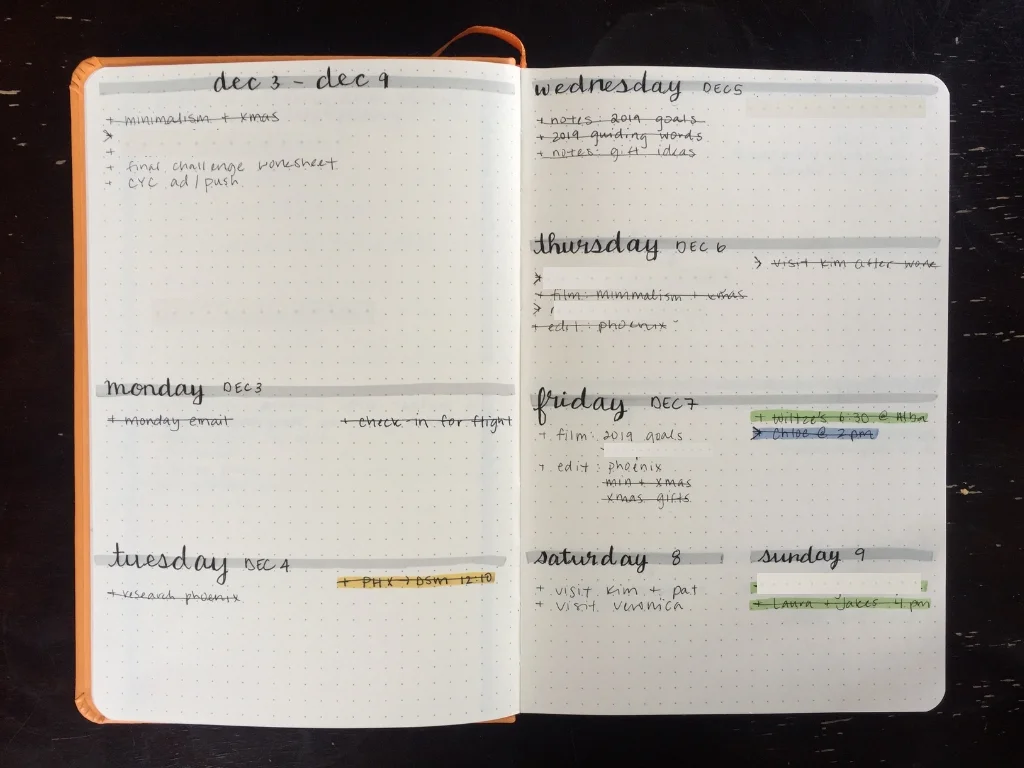
I made a video at the start of the month sharing my new bullet journal set up, and I wanted to make a complimentary blog post to share the details I went over, because when you’re trying to design your own bullet journal some people do better with a blog post over a video.

Let’s start with the supplies I use:

Rhodia dot journal: This is my third year using this journal. The quality is great and that’s why I keep going back, but I wish they had more color selection.

Clear ruler: I use a 15 cm clear ruler to draw all my lines. I don’t know how people make straight lines without rulers, and let’s just say I’m particular about creating straight lines. 

Mechanical pencil — I just use this for outlining before committing with a pen, marking out spacing, etc. You could use any sort of pencil, but I just have a mechanical one. 

Zebra Mildliner Highlighters: I was informed that these are actually MILDliners not MIDliners, whoops. These are new for me this year and I’m excited to incorporate them into my BUJO. I wanted a way to separate between different types of entries on yearly and monthly calendars. I have a different color for travel, races, calls or interviews, appointments, events, birthdays + FemmeHead.

Now my favorite part, fine liners. They are life! The thinner the better. I use these day to day for everything else in my BUJO — the headers, spreads, you name it. 

Kuretake Mangaka 01 : I like this one a lot and use it for day to day writing.

Pilot Razor Point: This one is just slightly thicker so I’ve been using it to write in my gratitude journal. 

Pigma Micron 0.3 and Pigma Micron 0.2: I love these pens and use them day to day

Marvey Le Pen: This one is actually thicker then most of the others so after I used it for setting up my bullet journal I decided to not use it in there anymore. 

Ok, now onto the set up, layout and spreads. 

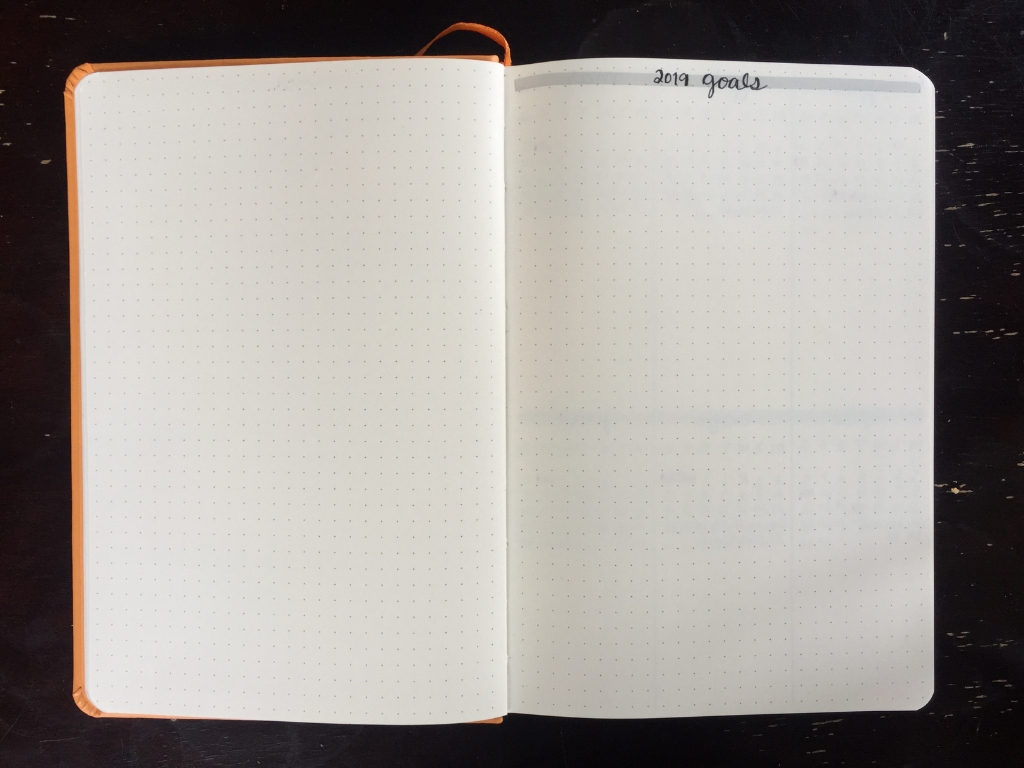
Starting with the fresh year I create a page for my 2019 goals, which is still currently blank besides the header because I haven’t gone through the brainstorming process of choosing my goals.  And don’t worry I’ll be sharing that in an upcoming video.

The next spread is my yearly overview. Last year was my first year of doing this, and it was a much needed addition. I love having a space where I can see everything that I have coming up, as well as a place to put an event or travel when it’s planned so it’s not forgotten.

My yearly overview is a two page spread with six months on each page. I have a small calendar of each month at the top of each section followed by a blank space under each to write out important dates and happenings that month. 

This year’s overview is still pretty blank because I don’t put things in here until they’re finalized, such as travel. So far you can see where I’ve highlighted people’s birthdays, and a few races I know the dates for.

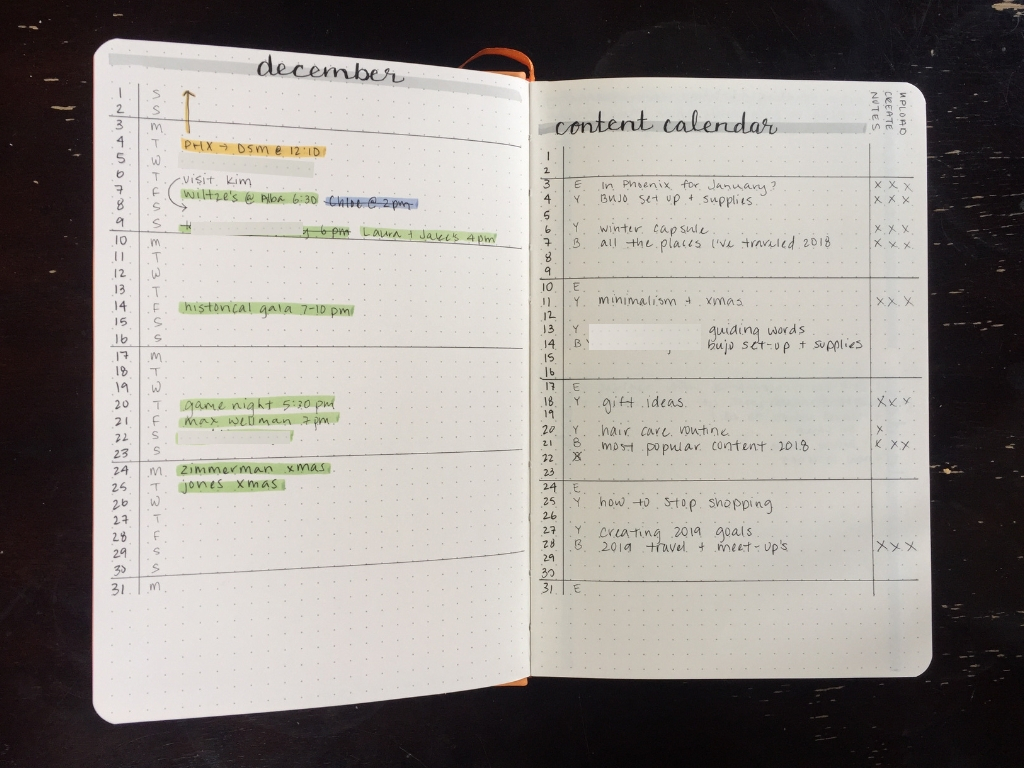
Next is my monthly overview. This is a single page calendar that is a minimal design of the date and day of the week down the left side of the page. I separate the weeks with a line between Sunday and Monday. 

On the following page is my content calendar, which has a similar layout to my monthly overview but then I add a few check off boxes on the right side for “Notes” “Create” and “Upload” so I can keep track with where I am with each piece of content I’m creating. I often bulk create content so it’s helpful to know where I’m at.

From there is my brain dump which is a two page spread broken up into four sections labeled, “Content”, “To-Do’s”, “Research” and “Ideas” because these are the most common/general categories for what my brain dump consists of anyways. 

And the final spread is my weekly overview. It is two pages with the top half of the first blank for my to-do’s followed for a space for Monday and then Tuesday with the week on the top of that page. The following page is Wednesday through Sunday, with the weekend sharing one section since I usually have less those days. 

So instead of going spread to spread completing each before moving on to the next I usually go through and do each step for each spread before moving onto the next step. And for me those are:

— outline, mark spacing in pencil 

— write everything with a fine liner 

— go back and thicken downstrokes with heavier pen

— go back with fine liner and cross t’s and dot i’s

— go back and erase all the pencil 

— draw all the necessary lines with ruler

— highlight headers using ruler to get straight line

— fill in calendar

— highlight events, etc. with different colors

And the great thing about using a bullet journal system is that you can customize it, tweak it and change it completely as you create it. So, if I get bored or don’t like a design I can do it differently next time.

[Things are hidden in my photos of my BUJO for privacy, duh. Promise it’s not that exciting. And affiliate links are used in this article, which don’t cost you anything, just give me a teeny little kickback if you use that link and buy the item. So, help a sister out.]

December 14, 2018 /Victoria Zimmerman
bullet journal, bujo, bullet journal supplies, bullet journal set-up
minimalism, business
Comment

30 Day Morning Challenge Info + Invite

November 07, 2018 by Victoria Zimmerman in body, business, mind, running

This is an invitation to you, from me. 

It’s for those of us trying to add in or trade out a few habits to recreate our morning routines. I don’t know about you but I’ve found that my morning, what I do first thing in the day is what sets the structure for the rest of my day. 

It started because I’m constantly trying to tweak my routine to what works best and sets me up best for the day. Like everyone else I have my ideal routine, but making time for that or sticking to it is the challenge isn’t it? 

And so I got to thinking, what makes you accountable? Having someone else, right? Why not invite anyone who wants to join in to, you know, join in. So, I started putting out a few feelers her and there, and the response has been overwhelming. 

Right now as I write the rough draft for this blog (Tuesday, 7:50 am) I have over 650 amazing people joining in. What? That is insane, but in the best way possible. 

I’m going to talk through what I have planned, and you are invited to join in for as much as you want, or as little as you want. You can just take the free worksheets and use them, or you can join in on every live video, share your triumphs and struggles in the Facebook group, keep up on my vlog and Instagram. Your choice. 

Ok, so let’s get into how this is all going to go down.

First, I’d love if you would go here, and sign up for the 30 Day Morning Challenge with your email, and also get the free worksheets. I’m going to be sending out reminder emails and who knows what other goodies, so it would be great to be able to contact everyone in one place. (Not everyone has Facebook or Instagram, but I think everyone has an email.) 

Next, join the Facebook group (if you have Facebook of course. Props to those of you who never got it or have deleted it). This is where we can all share our goals, the habits we want to add, our worksheets, and our struggles. Plus it can be a place where we can all help each other stay accountable, offer advice and just being a loving supporting community. 

[Just a side note quick: not that I’m worried about this but I’m not down for any negativity, trolls or rudeness. If I see any of that you will be removed. “Ain’t nobody got time for that!”]

And finally you can get click to get a notification for the live stream on YouTube. It’s going to be on my second channel, where I’m also going to be doing updates on my vlog. 

The dates for the live streams are:

11.9 — the first live stream before the challenge begins so we can all set ourselves up for success!

11.12 — the challenge begins! (I’m going to be updating everyone on my vlog as well as my Instagram stories, and we’ll all be joining in on the Facebook group.)

11.19 — the first check-in which I have scheduled as a live video on YouTube. We’ll go through a worksheet I’ve created to access how we’re feeling, how we’re doing, where we can improve and how we can make those improvements.

11.26 — the second check-in, which is also a live video.

12.3 — third check- in!

12.10 — final check in + wrap up. I haven’t made the worksheets for this yet, but I know there will be a few 😉 

I hope you join in if it is something you’re interested in or curious about. Plus it’s completely free. You’re very welcome. Let me know what you’re looking to get out of this experience with me so I can craft it into something that benefits you.

November 07, 2018 /Victoria Zimmerman
body, business, mind, running
1 Comment

Fall is Like Your Luteal Phase

October 05, 2018 by Victoria Zimmerman in body, business, mind, period

I love the concept that the seasons exist within your menstrual cycle, and I definitely believe there is some truth to this. 

And by exploring this I believe you can gain a better understanding of your cycle. So, in honor of the changing seasons we’re going to talk about how fall is like our luteal phase. 


First off, your luteal phase is the end of your cycle before your period comes and your cycle starts again. Depending on the length of your particular cycle it is roughly the last week of your cycle. 

So, fall is like your luteal phase, but what about the rest of your cycle? 

Well, winter is like your menstrual phase (your period), spring is like your follicular phase and summer is similar to your ovulatory phase. 

And some cycles I feel like my luteal phase is more like what I expect my menstrual phase to be, than what my period is actually like. 

It’s like vacation, often there’s a lot of build up and excitement leading up to vacation that actually lasts longer than the trip itself. And I find that my period is like that. My body and mind prepares for it longer than it actually lasts. 

So, the first similarity between fall and our final phase — we slow down. 

The energy and excitement of summer, and our ovulatory phase, wears off. If you stop to pay attention you will notice this. 

Our physical energy wains, but that isn’t necessarily a negative. Because even though physically we are pushed to slow down, mentally we’re very active and creative during this phase. 

I don’t know about you but I’m already thinking about next year, about potential goals, things I want to do and accomplish. 

And just like that our luteal phase is the perfect time to focus inward, to reflect, think and dig deep within ourselves. 

For anything you’ve been hanging onto, dragging around with you, that’s no longer serving you, this is a great time to let that extra baggage go. 

As your physical energy slows down, you may find yourself more tired than before. This reminds me of the dreary, gray weather we’re currently experiencing here in Iowa, and how this always effects my energy level. 

I feel like it’s mother nature’s way of preparing me for the hibernation of winter and my period. Yes, there are those who are super active during the winter. (We don’t have any mountains to snowboard down here unfortunately. And I’m a bit of a hermit in the winter. I like to be warm, snuggled up and cozy.) 

But I’ve been working on my relationship with winter. Well, I started last year trying to change my attitude towards the season. And learning about hygge really helped me. 

These next parts are necessarily season specific, but I’ve been feeling a draw towards them currently as the season is changing. 

I have this pull towards evolving, stepping outside my comfort zone. Doing things that are obviously going to benefit me, but I’m feeling uncomfortable about doing. 

I’m trying to break down a few walls of comfort in an effort to evolve as a business, a brand and as a person. I’m working towards being uncomfortable, whether thats in a professional way, or pushing myself in my own life. 

Instead of retreating back to where I feel comfortable when I hit that resistance, I’m trying to be ok in that sensation. Because I know that’s where growth happens. 

It’s not fun, but it’s important. 

The luteal phase is also where I find myself wanting more space and time to myself. So, I try to schedule that in. I’ve been working from home more. I find the balance between being social and being by myself depending on where I am in my cycle.

I made sure I had this past Sunday at home to get all the little things done around the house that I wanted to. I just really wanted to make a cup of coffee, put on some music and clean my apartment. 

I find something about ending my week that way very cathartic, and it sends me into the upcoming week feeling fresh, revived and ready to go. 

And just like that I like to plan out some time to do things that I want during my different phases. 

What do you feel yourself drawn towards at the end of your cycle?

October 05, 2018 /Victoria Zimmerman
fall, luteal phase, seasons, cycle, menstrual cycle
body, business, mind, period
1 Comment

Pushing Yourself Outside Your Comfort Zone

September 28, 2018 by Victoria Zimmerman in body, mind, business, running

I am one of those people who can be a bit of a hermit. I know what I like, don’t like and what I’m comfortable doing. 


It is always a challenge when I first push myself outside my comfort zone, but it is usually always so rewarding.

And the three areas I’m going to talk about today are social, work and athletic.  

Let’s start with the easy one — athletically.

I’ve never considered myself an athletic person really. I was like the only one in my family that really did sports growing up, and I wasn’t ever really on varsity. 

But being an adult and having more control over what you do is a great thing. And I’ve been able to discover different things that I love. 

You’re probably aware that I didn’t really get into running until just last summer. Michael challenged me to run a marathon, and I thought what the heck, why not. So, I trained for a ran a marathon. 

Through that I also discovered trail running. I’ve always enjoyed going on hikes and walks, but trail running is so much fun. Plus, I think I prefer it over just regular running. 

Also last summer I decided to give a sprint triathlon a try, even though I hadn’t been training for one (outside my marathon training), but I wanted a new challenge, was bored with just running, and felt in decent shape. 

The challenge for my with doing triathlons is that I’m not the most efficient swimmer. Like I’m not going to drown, but I feel so slow. 

But at a certain point you just realize, what’s the worse that’s going to happen? I’m going to have to get pulled out of the water? Or maybe backstroke? 

Who cares?

I did my second sprint triathlon around a month ago, and I have not been running or training for anything currently, so I’m not in as good of shape as last summer. 

But I know what my body is capable of, and I was pretty sure that I could push myself through it. 

Once again I was nervous about the swim, and like 30 seconds into starting the race I thought, shit, I might have to get pulled out of the water. 

But I kept pushing myself, let go of feeling embarrassed and did the back stroke, and made it through the swim. 

There’s something I like about deciding to do a random tri without training. But maybe one of these days I will train for one. 

Work is another area that I find myself challenged in, but that’s a huge positive for me. I think I would get bored if I didn’t keep stretching myself, and pushing further and further. 

It was outside my comfort to start a YouTube channel, but look where that got me. 

It was outside my comfort zone to create a website, courses, to coach women about how to chart their menstrual cycles. But I wouldn’t be where I am without that. 

I was outside my comfort zone to do my first sponsored video, to talk to others about “what I did for work”. 

But looking back those steps seem so easy. 

And I try to remind myself of that when I’m facing my next challenge, whatever area of my life that is in. 

What’s something outside your comfort zone you’ve challenged yourself to, and how did you go about it?

September 28, 2018 /Victoria Zimmerman
comfort zone, challenge
body, mind, business, running
Comment

My Process of Creating Content

July 27, 2018 by Victoria Zimmerman in business

You guys wanted to hear more about how I create content for FemmeHead, so today I'm going to try and go through all the step, start to finish!

I keep a page in my bullet jo for my “brain dump” and one of the sections is for content ideas, so when I get an idea I can just write it there, and when it’s time to make next month’s content I can go and look at what I’ve written down.

I usually start planning the following month’s content the second to last week of the month. For example, I sat down the morning of July 17th and brainstormed and came up with my content calendar for August. 

So, let’s start there, how do I brainstorm ideas if I haven’t written enough down over the past month. 

Well, first I’ve got to look at how many videos and blogs I’m going to have that particular month. I simply do that by looking at the number of Tuesdays and Thursdays for videos and Wednesdays and Fridays for blogs. 

So, for example, I need 10 blog and 9 video ideas for August. 

I’ll grab my notebook so I can brainstorm without worrying about being fancy or neat. I’ll write down any ideas I’ve come up with that past month. 

And then I’ll usually look at what’s coming up that next month

     - any trips I'm going on that I might be able to share some aspect of

     - a course session starting that I want to promote

     - anything else worth sharing, as well as seasonal things like my capsule wardrobe

I have an ongoing general content ideas page on Evernote that I’ll look at, as well as a list of content ideas from followers that I keep from when I ask for recommendations. 

Some months it will take over the course of a few days to come up with enough ideas, and other months it will take me 15 minutes to make my whole content calendar. 

Once I have enough ideas I will go through and decide which I want to make videos about and which ones I’d rather write a blog post about. 

Then I need to balance those out between the different weeks based on what they’re about. Basically, so I don’t have four cycle related things in a row and then 5 minimalism things after that. 

Once I have it all organized in the notebook I will then make my content calendar both on my laptop, in Evernote, and also in my bullet journal. 

Then in a perfect world, I would work at least one week ahead, if not more on my content so I’m never stressed if something comes up. 

Part of my content calendar in my bullet journal is a little checklist that I go through when I’m creating my content. “Notes”, “Create”, “Done” and “Social”. I’ll go through what each of those means for me. 

NOTES:

The first thing I do is write all the notes I need for either the blog post or video I’m going to be making. This is my time to research and collect my thoughts on what I want to talk about. I do this in Evernote. 

CREATE:

Next, I either need to write or film it. Normally writing is just editing and organizing the notes I already have because I often take notes by writing out my thoughts. I aim for at least 500 words for my blog posts. Filming obviously involves getting ready, setting up my camera/background, sitting down and talking about that topic. 

DONE:

After that, I need to edit, post/upload and schedule it. It takes longer to edit a video than a blog post, as well as post/upload it. I also need to find a photo for my blog post or create a thumbnail for my video. Once it’s scheduled I’ll move on to the next step. 

SOCIAL:

I’ve been trying to get better at being more consistent on Instagram, and have found a posting schedule for that works. I don’t always post about my blogs and videos on my Instagram, but go through and choose which ones I want to post about. But I have been trying to post to Instagram every day. And once that’s finished I’m done for that particular post/video and can move on to the next. 

Now, it’s worth mentioning that I like to batch together these steps. So I’ll do the notes for two to four things, write them or film them on a different day, and then edit them. I find that it’s more efficient to batch process content. 

I hope this gives you an insight into how I make my content for FemmeHead. What is your process for content creation?

July 27, 2018 /Victoria Zimmerman
bullet journal, creating content, content creation
business
Comment
Photo cred: David Dewitt

Photo cred: David Dewitt

I Kind Of Want to Delete Facebook...

July 11, 2018 by Victoria Zimmerman in business, minimalism

I’ve got a very unimportant dilemma I’ve been mulling over:

Part of me wants to delete my Facebook. 

I created my Facebook as a sophomore in high school circa 2006 because of a boy. Yup, a boy. 

And I was a very active Facebook user through high school and college. Posting pictures, commenting on other people pictures and posts, sharing funny quotes or thoughts. Oh, and let’s not forget about messenger. 

Nowadays I actually only really use my Facebook to message friends and be a part of an 'event’ every now and then for a friend’s party or something similar. 

But I just looked it up and you don’t have to have a Facebook account to use messenger...

It’s been years since I posted photos, Instagram has replaced that for me. And Instagram is honestly probably my current favorite social media platform. I’m a very visual person. 

I don’t use Twitter as much as Instagram, but it has replaced Facebook as the place to post thoughts that pass through your head, articles and that sort of stuff. 

I know Facebook has a purpose, especially when it comes to running your own business, because “everyone is on Facebook”. But to be honest besides business it just isn’t relevant to my life anymore. So much of our lives revolves around social media, especially when you run a brand/business online. I know I've made that choice, but I don’t really fully utilize if for FemmeHead. (I know, shame on me!)

Sure, I have a page for FemmeHead and I’ll share stuff there when I post something new, but nothing revolutionary is happening on there. 

So, those are my thoughts. I want to delete it, but haven’t because I feel like I’m 'supposed' to have one for work. What are your thoughts? Has anyone deleted their Facebook? 

July 11, 2018 /Victoria Zimmerman
social media, facebook
business, minimalism
8 Comments

Starting Your Own Etsy Shop

July 06, 2018 by Victoria Zimmerman in business

I had a request to share the “how to” when it comes to starting your own Etsy shop, and I’d absolutely love to share my experience with this in hopes of helping someone else take that leap to start their own.

[Disclaimer: This is not a sponsored post. I wish it was…Etsy hit me up.]

First off Etsy makes it so easy for creators to open their own shop and sell their own products. If you’ve ever created a social media profile or anything simple like that you are beyond capable of starting your own Etsy shop. 

Obviously, you first need to figure out what you’re going to sell. 

I went into it knowing I wanted to sell some FemmeHead shirts and totes. 

I did some research trying to find the best platform to actually “sell” those things and I settled on Etsy. 

Years ago I had a little shop where I would sell wood bath trays and candle holders, so I was already familiar with it. 

So, you’ve got what you want to sell, next you need to decide on a price. 

This is totally up to you. There is always a number that comes to mind for me and that’s usually what I go with. 

You can look at what other people are selling similar things for, or just choose completely on your own. 

Is this something you’re going to make ahead of time (like, I make a batch of shirts and totes before putting them up) or is it something you’re going to make as people order it? 

Regardless you’re going to want a few examples for photos and such. 

Saying that you’re going to want to get your system down of how you’re going to create your products and you’re going to want to take some product photos for your shop. 

At some point, you’re going to want to actually create a shop on Etsy. If you’ve ever created your own Facebook, Instagram or any of that you’ll be able to do this step. 

I’m not going to walk you through this step because the site makes it really easy, and Google is your best friend for anything you’re unsure of. 

Basically, you just need to set up your bank account, shipping and a few things like that. And the site will tell you what you still need to do. 

So once you have that set up it’s time to list your products. 

If you haven’t taken those product photos, now is the time. Head to your Shop Manager tab and under that click on Listings. Once there on the top, right side there is a Add Listing button, click on that. 

Now, this is where you’ll put in what you’re selling. If you have multiples of the same product you can just use one listing, like I did when I had FemmeHead tote bags up for sale. 

As for my shirts, I made an individual listing for each because they are thrifted so I wanted everyone to be able to see that specific shirt and the details on that shirt so they could buy the right one for them.

First, you’ll be asked to add a photo, and you can add as many as you feel best show your product. While that uploads I like to scroll down and start filling out the other information. And it tells you what’s what, and why you need it. For example, I internally label each one of my shirts, and then put that in the SKU number section on the "add listing" form. Then when someone buys it I can see oh, they bought shirt number 34 and pull that exact shirt from my stock instead of accidentally mailing the wrong shirt. 

One thing I really like about Etsy is how easy they make it to ship your product once it’s sold. So be sure to fill out the shipping info at the bottom of each item listing. 

You can calculate costs, and save those as a preset option for future listings. Taking the time to do this will save you loads of time, so I recommend doing it. From there all you’ll need is the weight of the item and well as the packaged size. So, you’ll need to know what you’re shipping your products in. 

You can get as fancy or stay as simple as you want. I got a pack of pain manilla envelopes that I can send stuff in. And they’re pretty darn light so that saves on shipping costs. 

Depending on how many listings you want to put up I always save each one as a draft so I can post them all at once. 

Once you post them all, and people start buying your products you’ll get an email each time that happens, you can have conversations with your buyers if they have questions, and you can print shipping labels and mail all your goodies out. 

All in all it's pretty darn simple, and you should definitely do it if you've been playing around with the idea of it. 

Has anyone else started their own shop on Etsy, what's your experince been? 

July 06, 2018 /Victoria Zimmerman
etsy, merch
business
Comment

Programs + Products I Use For FemmeHead

May 09, 2018 by Victoria Zimmerman in business

I love learning about different programs and products other creators use, and I’ve found so many helpful things because of that. So, today I wanted to share what I use to keep this ship sailing smoothly. 

DIGITAL PROGRAMS:

Evernote — I learned about this during my senior year in college, but didn’t really start using it until FemmeHead came along. But now, it is my everything! It’s where I write everything, make lists, you name it. It all starts in Evernote. It is a place to write and organize text documents. Like Word but so much better in my opinion. 

Squarespace — In college I made websites with Wordpress, but since discovering and using Squarespace for FemmeHead I can’t imagine going back. It made creating a website that was simple and aesthetically appealing so so easy. 

Gmail — You’ve all heard of this, but I didn’t start using it until this past year. I know, what was I doing with my life!? I love that I can have all of my emails from three different accounts in one place. I have my old personal email, my new personal email, and my FemmeHead email. And having it all in one place makes it so much easier to keep up with. 

MailChimp — This is how I send out my weekly email to everyone and how I send out my email courses as well. Another must-have. 

GumRoad — This is the program I use to sell my courses and coaching. They take care of the payment processing and everything. 

Zapier — This is one of those middleman programs, and learning about it made life so much easier. So, when someone goes from my site to GumRoad to register for a course, Zapier is what connects that registrant back to my MailChimp account so they can receive the lessons when the course starts. And while I just use it to connect my GumRoad to my Mailchimp it can act as the connector between all sorts ofother programs and apps. 

Unsplash — This is where I get all of the images for my website. I almost don’t want to share it because it’s that good. 

Hootsuite — This is what I use to schedule social media posts on Facebook and Twitter. I had a lot of troubles with using it for Instagram because Instagram won’t other programs post automatically to your account for you. So for Instagram, I post manually still. 

Canva — I’m learning the Adobe editing programs, but I discovered Canva at the start of FemmeHead when I was trying to create a header in the correct size for my YouTube channel. And now I use it for all my editing needs. I create thumbnails, social media posts, green screen overlays for my videos, everything. 

iMovie — This is what I have always edited my videos on. It’s simple, easy and because I’ve been using it for so many years I can edit my videos in my sleep. 

YouTube Create tab — This is where I get the music for my videos. If you go to your creator studio for your channel on the left-hand side you’ll see “create” and then there’s a ton of music, and it tells you whether you need attribution or not for that song on YouTube. Once I discovered this it made finding music for videos so much easier. 

Etsy — This is what I use to sell my FemmeHead merchandise. So far I’ve sold tote bags and shirts here, and plan to do more this spring. And it makes creating shipping labels super easy for sending the items out. 

Asana — I just discovered this in the past month. I think it would be awesome for group work, but I use it to create my social media calendar. I can have when I want to post what, a place for what I want to post and I can click “complete” when it’s posted, which is oh so satisfying. Being consistent on social media is something I’ve struggled with and while I’m still not perfect this helps so much. 

Calendy — This was another recent discovery, and it makes scheduling appointments, calls, etc. so much easier than going back and forth via email. It syncs with your Google Calendar, so it knows your availability and then you can just send a person the link to your Calendy and they can choose a time that works for them. 


PHYSICAL PRODUCTS:

Canon t5i — This is the camera I bought when I decided I wanted to start a YouTube channel. Spending over $500 was a big thing for me (and still is). But if I had to go back I’d buy the same camera. I wanted one that could both take videos and photos. Not to mention it’s just super simple to use and learn how to do things on. 

Canon g7x — This camera joined the family last summer, and it’s a loved addition. I wanted something more portable for travel, and I wanted to start vlogging, both of which are hard with my big t5i. And I absolutely love my g7x. I love that it can fit easily in my backpack, pocket or hand. 

GoPro Hero Session — This was a wedding gift, but it gets plenty of use. Mostly when we travel because it’s so tiny and waterproof. My only complaint is that I wish it had some sort of built-in stabilizer. I wish I could use it to film while running and not have completely unusable, shaky footage. But it’s really easy to use while you’re doing any sort of activity. 

MacBook Pro — This was another big purchase for me. It’s my third laptop I’ve ever owned. My dad bought me an HP as my high school graduation gift, which died during midterms or finals my senior year (talk about stressful). Thankfully a family friend was looking to sell his old 2006 MacBook Pro, and so I got it for $400. That lasted me for a few years until about 6 months into starting FemmeHead when I realized I needed a faster laptop for making videos. And that’s when I bought my current MacBook Pro, which has been the apple of my eye ever since. I’m a total Mac girl. 

Tripod (from Best Buy) — I got this for $30 a few months into starting my YouTube channel. It was a hassle to stack up books to prop my camera up on for videos. It was cheap and one of the legs snapped off a few months into using it. Thankfully I only ever use it at home so taping the leg back on keeps it pretty secure for a few months at a time. 

Joby GorillaPod — I wanted a small tripod for travel and just something that was more mobile. And it has come in pretty handy when I vlog around the house. But I don’t use it as much when we travel as I thought I would. 

Rode Mic — This was another big purchase for me. I wanted to step up my audio game. And this is the pretty standard microphone for YouTubers. 

Blue Yeti Mic — This is actually my brother’s really nice microphone, but I borrow it when I need to do podcast interviews or anything when I want good audio. I definitely enjoy having access to it. 

Transcend SD cards — These have been my favorite SD cards. 

Seagate Drive — I love this external hard drive. I actually need to buy another one because I've filled up my 1TB so far. This is where I store documents, photos, video or anything I want to keep long-term. 

Rhodia Dot Journal — This is what I use for my bullet journal, which is pretty crucial to what I get done for FemmeHead. Making the switch from a standard planner to a bullet journal was a big moment for me, and I highly recommend it. 

iPhone — And last but not least, my phone. Pretty standard, but I use it for social media and photos, even though it has like zero storage on it. I’ll definitely take that into consideration when it comes time to get a new phone in the future. 


Are there any products or programs I’m missing out on that would make my life oh so much easier? I’m all ears. What are the things you use to make life a breeze?

May 09, 2018 /Victoria Zimmerman
business
business
Comment

What I Pack for Work

March 30, 2018 by Victoria Zimmerman in business

I’ve been working at a coffee shop a lot recently. I seem to fluctuate between feeling more productive at home and craving the atmosphere of being around other people. So, I pack up and work for the first half of the day at my favorite coffee shop, Ritual Cafe. 

Everything I need for a day of work fits in my backpack, and today I thought it would be fun to give you a mental snapshot of what those things are. 

First off and most importantly is my laptop, and the charger to go along with that. I have a 2015 13” MacBook Pro that I adore. You can read this post about how I thought I ruined it on the way to Sri Lanka, and this post about how it magically came back to life when we got home. My laptop is such a necessity and the center of everything I do. 

From there a crucial part of my work productivity, regardless of where I am, is my bullet journal which I use as my planner. I use a Rhodia dot journal, and I don’t know if I’ll ever go back to a standard planner. I have my calendar, my ideas, my to-do’s, everything in here. 

I normally also always have my personal journal with me. It’s just something I love having on hand because you never know when the mood is going to strike where you’re like “I need to write about this!” It’s a great way to document life as well as work through thoughts. It's not necessarily a must-have for work, but if something is floating around my head, distracting me, it helps to have a place to put in into writing so I can get back to work. 

Lately, I’ve also been carrying around a plain lined notebook. I like making lists, taking notes, and such in here instead of on my computer or in my bullet journal. I really like physically writing some stuff out, and it’s great to have paper on hand for when you need to do that. 

Because of these three paper notebooks I carry around I always have my pencil pouch with me, and while it only has a single mechanical pencil in it I keep other important bits in there:

+ Headphones (a must when you’re working outside the home whether it’s for editing videos or needing to listening to music)

+ Foray StyleMark Fine 0.5 mm in black (my main bullet journal pen)

+ Papermate Flair Medium (an unnecessary pen I use to create my fake calligraphy in my bullet journal)

+ Frixion Ball Slim in blue and orange (my favorite pens to journal and write with)

+ small clear ruler (use it to fill out my bullet journal)

+ Chapstick (who doesn’t travel with this?)

I normally have my Seagate 1TB external hard drive in my bag. This is where I keep old video footage as well as important documents. It’s nice to have it if I’m editing a video where I reference back to something I have footage of. (I need to get a second external hard drive because my current one is just about full.)

I almost always have my Canon g7x for me for filming when I’m out and about. I’m awful when it comes to filming in public, but if the mood strikes I want to have my camera on hand. Oh, and I guess it’s worth mentioning that I have my phone, keys, and wallet with me at all times, but that’s pretty much a given for everyone.

I also bring my travel coffee mug with me for working from the coffee shop because even though I’m going to sit there and drink it, I find that it stays warmer longer with the lid, and if I don’t finish it I can bring it with me. (But this rarely happens). 

What are your work must haves? At minimum, it’s obviously my laptop, but I’m pretty much unstoppable with these few things I talked about today. And it all fits easily into my backpack. 

March 30, 2018 /Victoria Zimmerman
work, self-employed
business
Comment

I Ruined My Laptop | Part Two

February 14, 2018 by Victoria Zimmerman in business, travel

So, if you can recall I busted my laptop on the way to Sri Lanka.

I was bummed out to say the least. It was a big purchase for me two years ago, and it’s not like I have a ton of cash laying around to buy a new one (especially after our trip).

But obviously something was going to have to give because I need a computer for work.

So, while I was enjoying vacation I was also trying to come up with a solution when I got home.

I haven’t taken my laptop into Apple yet, so I’m not sure if there’s an “inexpensive” fix to it or if it’s gone for good.

Michael and I were talking about it one day and he suggested using the iPad as a temporary fix until I saved up and found a computer I wanted. He also has a MacBook with a broken screen that’s a $400 fix if I want to go that route.

In the long run I think I’ve decided I want to save up for an iMac since I work from home 85% of the time. But I need something until then and I need a portable option for when we travel.

I opted for the iPad option. We already had it from a Black Friday deal, and didn’t really use it. So, while in Sri Lanka I started researching the best way to ‘turn an iPad into a laptop’ essentially. And here’s what I’ve done.

The first thing I knew I would need was a keyboard. No question about that. So, I opted for a keyboard case instead of a keyboard and stand option so it was portable.

I also knew I needed a way to get video footage from my SD cards onto it so I could edit videos. My camera does have a WiFi option, but seeing as I didn’t want to hassle with that I decided to get a lightening to SD card adapter, which was a great options.

The first day I was using it with the keyboard I found it a bit fussy to not have a mouse or keypad so I looked into buying one of those, but for the time being I’m just using the screen, which just takes some getting used to.

It can be a bit finicky at times and has taken some time to get used to the differences, but because we already had the iPad it was a pretty inexpensive solution.

Depending on how I like it this might actually become my long term portable option after I get the iMac, which hopefully I can buy in a month or two.

Update: I’m sitting outside Apple waiting for an appointment. I’ve decided to pay the money to get Michael’s old MacBook Pro (which is the same model as mine) fixed. After trying to edit a video yesterday on the iPad I just found myself pretty frustrated. There’s an obvious difference between the iPad and the MacBook Pro, and I was beyond frazzled by the end of the day.

I was working to get a video up because I post every Tuesday and Thursday. Well, it’s still sitting on the iPad because even after I got the very simply edited video exported it now won’t upload to YouTube.

I just came to the conclusion that having a computer is too much of an intregal part of running FemmeHead. I really don’t want to see it hurt by not having a computer and I think it would be.

I think I’m still going to save up for an iMac, but for the time being having a MacBook Pro to work from will be such a treat. I’ve brought both his laptop to send in to get fixed as well as mine to see if there’s anything to be done about it or to at least get stuff off of it.

If you’re just looking to type documents, send emails and such, you can definitely do that on an iPad with a keyboard case. But when it comes to editing things, videos and such, the iPad is not made for that.

Update: I got called in for my appointment. We started by sending off Michael’s old MacBook to get repaired and mailed back to our house. That was going to cost $475, which was fine. And then he took my poor laptop to the back to open it up and look to see what sort of water damage there was.

He came back probably 10 minutes later and said, wait for it, that it looked fine inside and he wanted to plug it in and turn it on.

Wait what?

Ok, I said, as I fumbled in my bag for my charger. I plugged it and he pressed a few keys along with the power button and I holy mother of god it turned on. I about pooped myself.

I still didn’t want to get my hopes up because he said that he was going to run diagnostics on it. That took another 5-7 minutes. In the mean time I asked him why my screen looked like it was separating around the edge, and he said it was called ‘delaminating’ and we could look at repair options for that once the diagnostics finished.

And here’s the kicker, the diagnostics came back and he said it looked fine.

He said that even though my laptop was out of warranty, there was this replacement warranty thing when it came to screens delaminating because they aren’t supposed to do that. So, while it normally costs $475 to replace a screen they were going to do it for free (excuse me?!)

Then he said that my batttery wasn’t holding charge for as long as it should, and right before I could say I didn’t care about that he said he was going to try and get that replaced under the same thing as the screen...for free.

At this point I didn’t want to jinx myself, seriously, is this real life?

But I had to politely ask to cancel the repair order on Michael’s Mac because obviously if my computer had miraculously came back to life I didn’t need his as a replacement. And the Apple guy was kind enough to go grab it from the back and cancel the order.

I thanked him profusely, told him he was a rockstar and that he made my week, no the entire month for me. And then I left.

So at the moment it’s best case senario. My laptop is being sent in to essentially be spruced up, and it’s not going to cost me a thing (unless something else pops up while they have it).

But you guys! I’m over the moon right now.

I tried to turn it on after it got wet on the plane, but then my brother told me that you’re not supposed to try and turn on or charge electronics when they get wet. Not until they dry out. So I waited until a few days before we came back to try again, just for the hell of it, because I was pretty sure there was no hope. And it didn’t turn on so I thought it was toast.

There is nothing better than electronics coming back from the dead.

Viva la MacBook Pro!

February 14, 2018 /Victoria Zimmerman
sri lanka, travel, business, laptop
business, travel
Comment